twincities.fyi

Articles in the Guides category

How to start a school patrol

The problem

ICE agents are horrible for schools. In my neighborhood, ICE agents will show up to recess why kids are out. They will drive around the school and shout to students that they are going to get them and their parents. When the students were planning a walkout, several people from the neighborhood had to plan for the possibility that ICE agents would use tear gas on them, which they had done before at a high school.

Even more sinister is they have been abducting students and sending them to detention centers out of state. Or kidnap parents and leave the kids behind.

One way forward

In Minneapolis, we are organizing neighborhood patrols to protect students and to create a feeling of safety for students and parents on their way to school. This usually looks like parents and volunteers from the neighborhood stationed at corners surrounding the school, as well as along any common thoroughfare that students use to get to school. These parents watch out for ICE and respond to threats when they happen.

Patrols

Patrols are 30 minutes to an hour, depending on what your school needs and how many people are available.

A patroller needs:

  • a whistle
  • a charged phone
  • earbuds or headphones
  • optionally, a mask that covers your face for ICE encounters

Patrollers stand on corners surrounding the school and keep an eye out for ICE activity.

The call

At the start of the shift, all the patrollers get on a Signal call to have audio communication. In addition to patrollers, two other important roles for the call are the dispatcher and the plate checker.

The dispatcher is the brain of the call. They join the call with a map in front of them and place everyone on the call on the map so they have a good idea of coverage and what areas need more people. As people join the call, they should check in with the dispatcher so the dispatcher can put them on their map.

The plate checker will check license plates. Ideally, your group has access to a spreadsheet with confirmed ICE license plates. The plate checker will have this spreadsheet open and check plates against known ICE license plates. Patrollers will ask for a plate check in the chat and say the plate using the NATO phonetic alphabet to avoid confusion. The plate checker will respond with a "negative" or confirm that the plate belongs to an ICE vehicle.

The communication

Communication should follow radio best practices. When joining the call, announce who you are. Generally, you want to wait for the recipient to acknowledge. So you might open with "Dispatch, this is Coco" and the dispatcher would respond with "Go for Dispatch." Keeping things concise is important because sometimes multiple ICE vehicles may be in play at once, and if communication is not efficient that leads to a more confusing and less organized response.

The schedule

We cover the hour up to the morning bell (with some overlap for late arrivals) and the hour after dismissal. We also have some ad hoc patrols if there are some after school events.

Responding to ICE

When you spot an ICE vehicle or ICE agents at your school, you should make noise to alert parents, students, and teachers. This may be blowing a whistle or honking your horn. You should also start recording their activity.

The goal with all of these actions is for ICE to leave. In my experience, their presence at the school is not part of a targeted action, but rather an attempt to intimidate the school community. I regularly see taunting parents and students and driving in circles around the school. I have also seen them abducting students who have legal status.

Their objective is cruelty.

Our objective is to scare them away from our community and to collect evidence for their future prosecution. With an organized group of patrollers, we can make our schools safer.

If you would like me to help you set up your school patrol, please get in touch.
Published:

By Coco

How to lock down your iPhone

Why lock down your iPhone?

If law enforcement have your phone, it is legal for them to unlock your phone using your fingerprint or your face. However, if your phone has a numerical password on it, it is illegal for them to compel you to tell them the code access your phone.

To me, this is absurd. Like, it should always be illegal to enter my home regardless if my door is locked. However, we live in a judicial system run by judges who don't understand technology.

What needs to be locked?

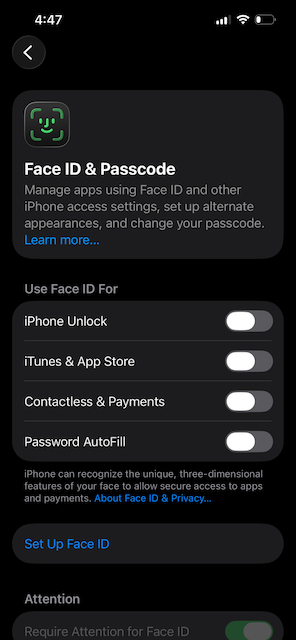
The most important thing is to take off your face or fingerprint for unlocking your phone. Personally, I don't even set it up when I get a new phone. That way, there's no danger of me accidentally turning it on.

A screenshot of the settings app of an iPhone. There are four FaceID options that are all off. FaceID has not been set up on this iPhone

This means that you will be using your code to unlock your phone. This can seem really inconvenient at first, but once you get the muscle memory down it will take one or two seconds.

I have a six digit code on my phone, because in the event law enforcement want to illegally try to crack the code it will take them longer than a 4 digit code.

Additional steps

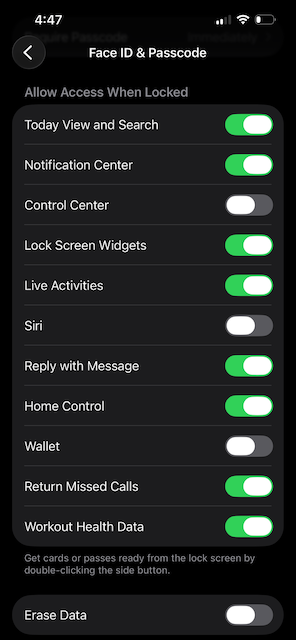
I also take some additional steps: I turn off Control Center, Siri, and Wallet from the lock screen.

If Control Center is on, law enforcement can turn on Airplane Mode without unlocking your phone. If you are detained and you are sharing location or streaming video or recording and uploading audio, putting your phone in Airplane mode can stop those activities immediately, putting you in a more dangerous position.

I disable Siri so that no one can as to read messages or other private data from the lock screen. I don't know exactly the threat model here, but I certainly feel better without Siri on my lock screen.

Then Wallet is disabled because sometimes I buy too many oat milk lattes! Sue me!

A screenshot of the settings app of an iPhone. The section is called "Allow Access When Locked". The toggles for Control Center, Siri, and Wallet are in the off position.

Published:

By Coco

How does a VPN work?

An introduction to the Internet's phone book.

The Internet was built on older networks: namely, the phone network. In a phone network, you can call anyone who is connected so long as you have their phone number. Let's imagine a simple phone book:

Name Phone number
Picard +33 76 43 23 45
Riker +1 907 555 2384
O'Brien +353 76 74 23 12

If you call one of the numbers in this book, you get the person associated with that number. If you don't know someone's number, you can use this phone book to look the number up.

The Internet also has a phone book. It's called the Domain Name System, or DNS. In DNS, each website is associated with a number: its IP address. An IP address is like a website's phone number.

Name IP address
google.com 142.250.191.142
instagram.com 157.240.245.174
wikipedia.com 208.80.154.232

On the Internet, there are DNS servers that store lots of records like the ones in the table above. When you type in a web address into your browser, your computer makes a request to a DNS server to find the IP address of the website you'd like to visit. It finds the record, and you can connect to the website by making requests to its IP address.

DNS and privacy

This system of making a request to a DNS server presents a privacy problem. DNS requests are largely unencrypted, so that means the websites you lookup with the DNS server are public to interlopers such as your internet service provider, any system in transit between you and the DNS server, or anyone on your Wifi network (think a Wifi network at a coffee shop).

This means that any one of those parties can see what sites you go to and infer what you were doing. For example, if I was eavesdropping on DNS requests and I saw that a user was making a lot of DNS requests for sites on beekeeping, I could infer that they were getting into beekeeping (or already a beekeeper! Imagine!). When combined with location data such as where your network is physically located, these inferences can become very powerful.

What is a VPN?

A VPN stands for virtual private network. When you turn on a VPN, your computer connects to a private network and makes requests from that network instead of the network that you're connected to.

This means that your DNS traffic looks different. Anyone monitoring your traffic, such as an interloper on the coffee shop Wifi network or your internet service provider, does not see your DNS requests. Instead, your requests get routed first to the VPN and then to the larger Internet.

For example, let's say that your VPN provider allows you to select a VPN in Chicago. First, your device will establish a connection to this Chicago VPN. Once that connection is established, Internet traffic will appear to come from that address in Chicago rather than the Wifi that your device is connected to. This means that DNS requests are also sent from that VPN and are much harder to trace back to you.

Safety considerations

When using a VPN, you want to select a VPN provider you trust. If I wanted to get a lot of information about network traffic, I could create a virtual private network myself and advertise free VPN access. Then when users joined my VPN, I could save their device information and all their DNS requests, effectively duplicating the privacy problem they were trying to avoid by using a VPN. Be sure to only use VPNs from trusted providers like Proton or NordVPN.

Adding a VPN you your phone.

Engadget has a good guide on adding the VPN to your iPhone. I don't have an Android, but this support article seems to be what you'll need for that platform.

Published:

By Coco

Have something you want to see here? Send me an email.